|
|
|
|
|

|
|
TEMPEST POTS Fax USA Cryptek
Rugged secure fax machine · AN/UXC-10
TS-21 BLACKJACK, also known as AN/UXC-10, is a rugged
secure facsimile machine (fax)
for use in military environments, developed around 1995 by
Cryptek in Sterling
(VA, USA). It can easily be adapted for airborne, shipboard and vehicle
application, and allows transmission of hi-resolution images via
compatible COMSEC equipment
like STU-II, STU-III, STE,
KG-84, KY-57, KY-68,
KIV-7, etc.
The device is also known by its military designator 5895-01-457-9904.
|
The device is housed in a compartmented die-cast aluminium enclosure
that measures 492 × 420 × 180 mm and weighs no less than 18.6 kg.
Its shock-absorbing rubber corners allow the device to be used in
harsh environments.
The device is interoperable with standard (non-secure) ITU Group 3
fax machines, but was primarily intended for use in combination with
an NSA-approved Type I or Type II encryption device, such as the
American STU-II and STU-III secure
telephones, and compatible devices like the
Philips Spendex 40,
but also the later STE.
|
|
|
Apart from use in combination with
(military) telephone equipment, the
UXC-10 (TS-21) was also suitable for dedicated link encryptors
like the KG-84 and its successor KIV-7,
and secure voice products like KY-57, KY-68
and KY-99.
A list of approved COMSEC devices can be found here.
UXC-10 (TS-21) 1 is fully shielded against unwanted emanations, according
to US DoD and NATO TEMPEST standards.
Note that it does not contain any cryptographic capabilities
itself, but should be used in combination with a suitable
US-DoD/NATO approved COMSEC encryption device.
Within the US Navy, the first 63 AN/UXC-10 units were supplied in 2003.
By 2007, it was mainly used for ship-to-shore
Marine Expeditionary Unit (MEU) 2 operations,
and for imagery transmission by radio battalions. It was also used to
transfer documentation when the regular LAN failed.
|
 |
-
The US Army/Navy designator AN/UXC-10 was issued on 6 December 1999.
-
The Marine Expeditionary Unit (MEU) is a self-sustained, forward-deployed
rapid-response force of the US Navy, ready to deploy quickly from naval
ships for various crises [3].
|
The image below provides an overview of the features of the TS-21.
All connections are at the rear, whilst four wire terminals are available
at the left side. All controls are at the top surface.
The device can roughly be divided into three areas:
(1) a document scanner at the rear left, (2) a thermal printer
at the font left, and (3) a control panel with full telephone keypad
at the right.
With the Image Server software, it can be used as a (secure) fax,
document scanner and printer.
The scanner consists of a 1728 element LED array that uses Contact Image Sensor
Technology. It allows images to be digitized in low, medium or high resolution,
using 1, 2, 4, 8 or 16 shades of grey.
The printer comprises a 1728 element linear thermal array, made by Kyocera in
Japan. Since it uses thermal paper, it does not rely on the supply of toner.
Although this is a major advantage, a thermal printer is also
a potentional source of EMC issues, which is why it is TEMPEST shielded.
All connections are hidden behind two access doors at the rear of
the device, as shown in the image below. Behind the leftmost door
are the receptacles for the AC mains (110-220V) and DC (28V).
Behind the right door are the DB25 receptacles for connection to the
COMSEC encryption device, and two RJ14 sockets for connection
to the telephone line and a regular telephone set.
|
|
|
Compatible COMSEC equipment on this website
|
|
|
The diagram below shows the basic setup, in which the TS-21 is
used as a regular (insecure) fax. The device is connected directly
to the analogue POTS network (line), whilst a common
telephone set
is connected to the TS-21 (phone). Outgoing calls can be initiated
directly by the TS-21.
For secure fax transmissions, the setup shown in the diagram below
must be used. In this case, an existing COMSEC device is connected
to the (insecure) line, whilst its RS232 serial port is connected
to the I/O RS232 connector (J3) at the rear of the TS-21.
Calls are initiated by the COMSEC device – which usually has its own
handset – and then handed over to the TS-21.
|
At the heart of the system is the TS-21 BLACKJACK
facsimile device (fax). It is bascially a regular Group 3
fax, with adequate shielding against unwanted loss of
information through intelligence bearing emanations (TEMPEST).
When used directly on the line, it is compatible with any
non-secure Group 3 fax. When connected to a secure voice terminal,
such as the STU-III, it allows encrypted fax
messages to be send to a remote setup with the same encryption
device, using the same (shared) cryptographic key.
|
|
|
When in transit, the top surface of the device must be covered
by a watertight lid that has locks in the four corners.
It can also be used as a dust cover when the device is not in
use.
|
|
|
The TS-21 can be powered directly from the AC mains, using a
standard IEC power cable like the one shown in the image on the right.
It should be connected to the IEC power socket behind the left
access door at the rear of the device.
The device has an auto-ranging power supply unit (PSU), that is
suitable for 110-240V AC.
|
|
|
|
When the device is used in a mobile environment where no 110/220V AC
power is available, it can also be powered from an 28V DC source
such as the battery of a truck.
|
|
|
The internal thermal printer uses regular 216 mm (8.5") wide
termal paper that was supplied on 50 m (165 ft) long rolls,
such as the one shown nthe image on the right.
The printer was made by Kyocera in Japan, and supplied to
Cryptek as an OEM product.
|
|
|
|
We are still looking for the original operating instructions
for this device. If you have a manual, either physically or
digitally, please contact us.
|
|
|
|
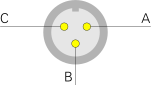
In a mobile environment, with no access to regular AC mains voltages,
the TS-21 can be powered by a 28V DC power source, such as the battery
of a truck. The voltage must be applied to the 3-pin male receptacle
behind the leftmost access door at the rear. Below is the pinout, when
looking into the male receptacle at the rear of the TS-21.
|
n.c. not connected +28V Battery (+) 0V Battery (-)
|
|
|
At the rear of the device, behind the leftmost access door, is a regular
IEC power socket, also known as a Euro-socket. The auto-ranging
switched-mode power supply unit (PSU) allows it to be connected to virtually
any 110-250V AC mains network in the world.
|
AC1 Mains 110/250V AC (1) AC2 Mains 110/250V AC (2) GND Ground
|
|
|
The exact pinout of this connector is currently unknown, but is
assumed to be similar to the regular V24 wiring. In most cases
a 1:1 extension cable (male/female) can be used directly between
J3 and the COMSEC device.
|
|
The pinout of this connector is currently unknown.
|
Device Rugged secure facsimile machine (fax) Purpose Insecure and secure (military) fax transmission Name TS-21 BLACKJACK Model 2194A Designator AN/UXC-10 Manufacturer Cryptek Year 1995 Country USA NSN 5815-01-478-7095 Predecessor AN/UXC-7 Compatibility see below Speed Synchronous: 64 Kbps
Asynchronous: 2400-38400 baud (auto-sensing) Standards see below Interfaces IAW MIL-STD-188-114, EIA/TIA-232 Scanner 1728 element contact scan LED array Printer 1728 element linear thermal array (Kyocera) Paper width 216 mm (211 mm effective) Cutter Manual, automatic Compression Modified Huffman Algorithm Transmission Uncompressed, compressed with FEC Power 110/240V/AC (46-64 Hz), 28V/DC Consumption ≤ 240W Dimensions 180 × 492 × 420 mm (HWD) Weight 15.6 kg (18.6 kg with cover) Price USD 15,515 (2007) [4]
|
- TS-21 BLACKJACK
- 2194A
- 2194A-1
- AN/UXC-10
- TAMCN
- NSN 5815-01-478-7095
|
- Interoperable with commercial ITU Group 3 fax
- Auto-ranging mains power supply unit
- US and NATO protocol standards
- Synchronous/asynchronous interfaces
- Modular construction
- Compatible with IBM PC, using Image Server software
- Multi-page operation
|
- MIL-STD-188-161-C Type I and Type II (16 and 32 kbps)
- STANAG-5000, Type I and Type II (4800 and 9600 baud)
- Commercial: ITU Group 3
- Environmental: DoD MIL-STD-810-E
- JITC Certified
|
AN/UCX-4 Litton AN/UXC-7 Magnavox
|
- Operating instructions
- Technical documentation
|
|
|
|
Any links shown in red are currently unavailable.
If you like the information on this website, why not make a donation?
© Crypto Museum. Created: Thursday 01 January 2026. Last changed: Tuesday, 06 January 2026 - 20:26 CET.
|
|

|
|
|